
| Alt-Name | NA |
| Release Type: | Official Release |
| Publisher(s): | Microdeal |
| Developer(s): | NA |
| Platform: | Dragon 32 |
| Genre: | Racing |
| Rating: | NA |
| Item Number: | NA |
| Barcode: | NA |
| Release Date: | 1985 |
| Description: | NA |
| Box Text: |
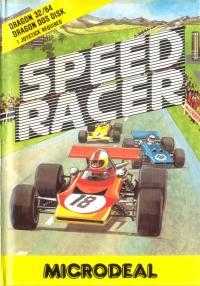
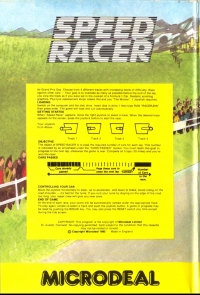
SPEED RACER Its Grand Prix Day. Choose from 4 different tracks with increasing levels of difficulty. Race against other cars - Your goal is to overtake as many as possible before the end of the lap, you view the track as if you were sat in the cockpit of a Formula 1 Car. Realistic scrolling graphics. Plus tyre replacement stops makes this and you "The Winner". 1 Joystick required. LOADING Switch on the computer and the disk drive. Insert disk in drive 1 then type RUN "RACER.BIN" the press enter. The game will load and run automatically. GETTING STARTED When "Speed Racer" appears, move the right joystick to select a track. When the desired track appears on the screen, press the joystick button to start the race. OBJECTIVE The object of SPEED RACER is to pass the required number of cars for each lap. This number is indicated by an arrowhead under the "CARS PASSED" marker. You must reach this goal to progress to the next lap, otherwise the game is over. Complete all 5 laps (10 miles) and you've won the race! CONTROLLING YOUR CAR Move the joystick horizontally to steer, up to accelerare, and down to brake. Avoid riding on the road shoulder - it's bad for the tyres. If you ruin your tyres by staying on the edge of the road too long, your repair crew will give you new ones. END OF GAME At the end of each race, your score will be automatically ranked under the appropriate track. To play again, simple re-select a track and push the joystick button. A game in progress may be reset by pushing the BREAK key. You may also press the RESET switch any time except during the title screen. |
| Date | User | Field | Value |
|---|---|---|---|
| 08-31-2026 | bizzgeburt | Box Text | SPEED RACER Its Grand Prix Day. Choose from 4 different tracks with increasing levels of difficulty. Race against other cars - Your goal is to overtake as many as possible before the end of the lap, you view the track as if you were sat in the cockpit of a Formula 1 Car. Realistic scrolling graphics. Plus tyre replacement stops makes this and you "The Winner". 1 Joystick required. LOADING Switch on the computer and the disk drive. Insert disk in drive 1 then type RUN "RACER.BIN" the press enter. The game will load and run automatically. GETTING STARTED When "Speed Racer" appears, move the right joystick to select a track. When the desired track appears on the screen, press the joystick button to start the race. OBJECTIVE The object of SPEED RACER is to pass the required number of cars for each lap. This number is indicated by an arrowhead under the "CARS PASSED" marker. You must reach this goal to progress to the next lap, otherwise the game is over. Complete all 5 laps (10 miles) and you've won the race! CONTROLLING YOUR CAR Move the joystick horizontally to steer, up to accelerare, and down to brake. Avoid riding on the road shoulder - it's bad for the tyres. If you ruin your tyres by staying on the edge of the road too long, your repair crew will give you new ones. END OF GAME At the end of each race, your score will be automatically ranked under the appropriate track. To play again, simple re-select a track and push the joystick button. A game in progress may be reset by pushing the BREAK key. You may also press the RESET switch any time except during the title screen. |
| 08-31-2026 | bizzgeburt | Publisher | 4267 |
| 08-27-2026 | bizzgeburt | Created |
This is a list of VGCollect users who have Speed Racer (disk) in their Collection.
| Username | Cart/Disc | Case/Box | Manual | Other | Message |
|---|---|---|---|---|---|
| None | |||||
This is a list of VGCollect users who have Speed Racer (disk) in their Sell List.
| Username | Message |
|---|---|
| None | |
This is a list of VGCollect users who have Speed Racer (disk) in their Wish List.
| Username | Message |
|---|---|
| None | |
|
You must be logged in to see Your Stuff. |